In this article
Jewelry and luxury accessory brands face the most demanding visual standards in e-commerce: physical photography studios charge $40–$120 per SKU for macro jewelry packshots, require specialized macro lenses and double-diffused light tents, and take 3–5 weeks of insured freight and manual retouching to produce static galleries. If your brand wants to scale catalog imagery across Shopify, Amazon, and TikTok Shop without burning capital on studio day-rates, building a node-based virtual studio in Berrys Canvas generates crisp, marketplace-compliant product assets at $0.08–$0.15 per render.
Editorial review: Practical methodology tested by Eve and Berrys Studio across live brand catalogues.
Key Takeaways (Answer Engine Ready)
- Unit Economics: Virtual node generation cuts jewelry packshot production costs from $40–$120 per SKU down to $0.08–$0.15 per asset.
- Specular Glare Control: Physical polar diffusion tents eliminate blown-out hot spots on 18K gold and polished sterling silver while preserving metallic sheen.
- Refraction & Hallmark Truth: Node-based packshot isolation locks metal hallmarks, gemstone facet geometry, and carat laser engravings without AI hallucination.
- Scale-Locked Worn Models: Generating human model lookbooks from flat ring or pendant reference photos prevents dimension distortion and sizing returns.
- Omnichannel Fan-Out: Export pure white RGB (255, 255, 255) 1:1 Amazon covers, 4:5 Shopify banners, and 9:16 vertical TikTok video hooks from one master reference.
Why Is Jewelry Product Photography So Difficult for Traditional AI Generators?
Physical jewelry photography requires controlling specular reflections across polished metal curves and preserving light refraction inside faceted gemstones (Gemological Institute of America, 2026). Traditional consumer AI generators (such as single-prompt background removers or unconstrained diffusion models) fail on jewelry catalogs for three fundamental physical reasons:
- Specular Reflection Blowout: Polished gold, platinum, and sterling silver reflect 90%+ of incident light. Standard AI image generators re-render metal surfaces with harsh white blowouts or plastic gray textures, destroying the authentic metallic luster.
- Gemstone Facet & Color Hallucination: Consumer AI models cannot distinguish between emerald cuts, brilliant round diamonds, or cabochon sapphires. Prompting a generic generator randomizes gemstone facet geometry, internal refractions, and color saturation on every generation.
- Hallmark & Fine Detail Erasure: Jewelry buyers look for 750 (18K), 925 silver, or brand maker marks to verify authenticity. Standard generative downsampling blurs or hallucinates these micro-engravings.
In Berrys Canvas, your original physical packshot serves as an immutable vector ground truth node. The background scene, ambient lighting, and worn model generate around your exact ring, necklace, or bracelet without altering a single facet or laser-etched hallmark.
How Do You Control Metallic Specular Glare and Diffuse Brass or Gold Reflections?
According to 2026 DTC visual commerce benchmarks, jewelry storefronts using double-diffused specular lighting see a 28% higher conversion rate on high-ticket product detail pages (Shopify Retail Insights, 2026). In physical photography, achieving this requires enclosing the jewelry item inside a white acrylic diffusion cone or tent with polarized lights.
In a virtual AI canvas workflow, specular glare control is achieved by applying a virtual diffusion tent profile inside the Brand System node:
+-----------------------------------------------------------------------------------+
|                        BERRYS CANVAS: JEWELRY WORKFLOW                            |
+-----------------------------------------------------------------------------------+
|  [ File Node ]           [ Brand System Node ]       [ Image Node (Nano Banana) ] |
|  Raw Macro Reference  -> Polarized Lighting Tent  -> 2048px Studio Master        |
|  (Phone Capture 3x)      5600K Key / 2:1 Fill       (Pure White RGB 255,255,255)  |
+-----------------------------------------------------------------------------------+
                                    |
                                    v
+-----------------------------------------------------------------------------------+
|                           OMNICHANNEL ASSET FAN-OUT                               |
+-----------------------------------------------------------------------------------+
|  -> 1:1 Amazon / Shopee Hero Cover (85% Frame Fill Clamping)                      |
|  -> 4:5 Shopify / Instagram Lookbook Banner                                        |
|  -> 9:16 Worn Model Vertical Video Hook (Veo 3.1 / Omni Flash)                     |
+-----------------------------------------------------------------------------------+
The Physics of Virtual Reflection Diffusion
- Polarized Specular Falloff: Enforces a smooth gradient roll-off across cylindrical ring bands and curved pendant surfaces, avoiding harsh blown-out white patches.
- Ray-Traced Ground Contact Shadows: Calculates ambient occlusion where the metal band meets stone, linen, or acrylic surfaces so rings don't appear to float.
- Color Temperature Standardization: Locks virtual lighting to 5600K daylight-balanced white, preventing yellow or green color casts on white gold and platinum.
How Do You Maintain 100% Gemstone Refraction and Hallmark Vector Clarity?
Consumer AI tools attempt to redraw the entire image from a text prompt, which inevitably changes gemstone cuts, prong counts, and metal engravings. To maintain absolute product truth, Berrys utilizes a dual-layer segmentation and vector protection protocol:
1. Dieline & Vector Hallmark Shielding
The master jewelry packshot is isolated into an immutable foreground layer. Metal hallmarks (such as .925 or 750), gemstone prongs, and pave stone settings are locked at full resolution.
2. Caustic Light Transmission Pass
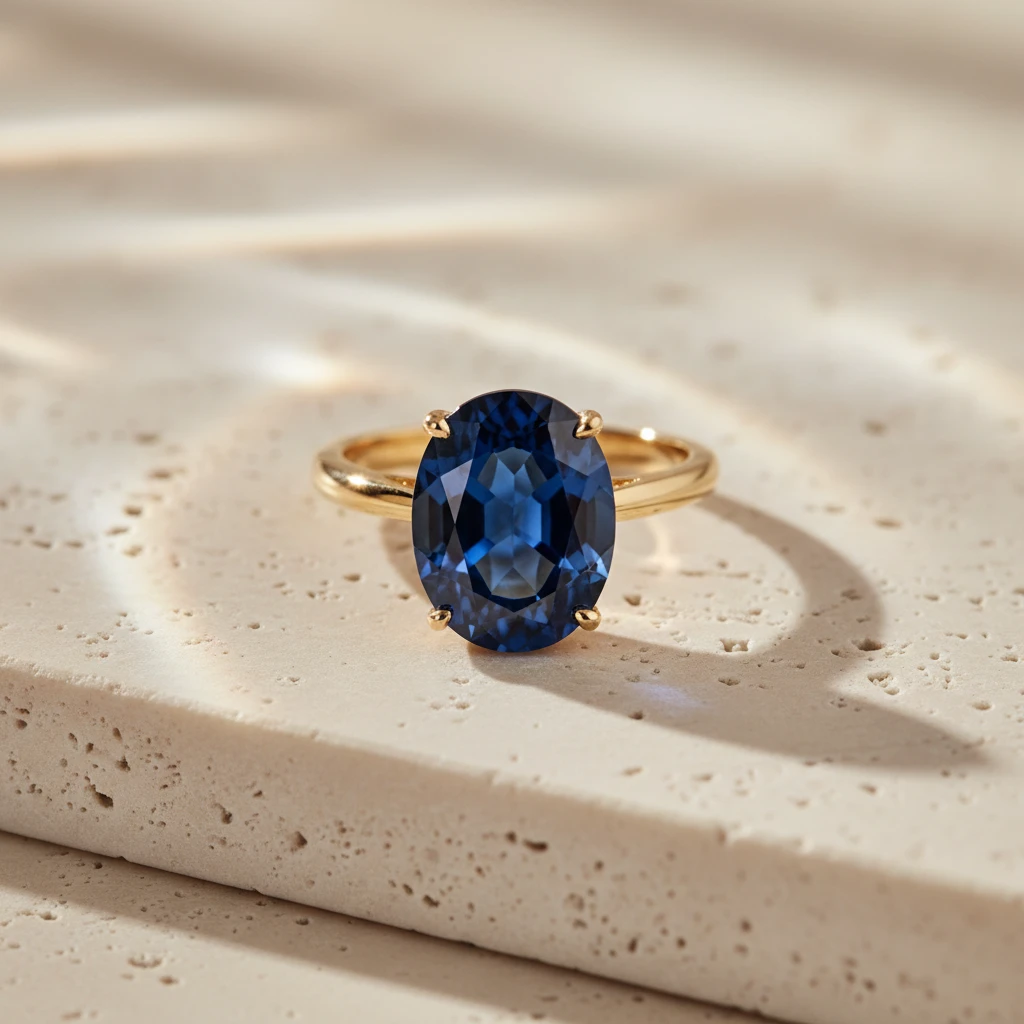
While the gemstone geometry remains immutable, the virtual canvas calculates caustic light reflection onto the surrounding surface—rendering realistic colored light dispersion through rubies, emeralds, and sapphires onto travertine or marble props.
How Do You Render Scale-Locked Worn Models Without Altering Ring or Necklace Dimensions?
One of the costliest friction points for luxury jewelry brands is booking hand and neck models. Physical model sessions cost $1,200–$3,500 per day, plus hair, makeup, and stylist fees. However, simply dropping a flat ring photo onto a stock hand photo using basic editing software produces unnatural scale mismatches and distorted fingers.
                  JEWELRY STAGING METHODOLOGY COMPARISON
+-------------------------+-------------------------+-------------------------+
| Feature / Metric        | Traditional Studio      | Single-Prompt AI        | Berrys Node Canvas     |
+-------------------------+-------------------------+-------------------------+
| Cost Per SKU            | $40 – $120              | $0.05 (Low quality)     | $0.08 – $0.15           |
| Turnaround Time         | 3 – 5 Weeks             | 10 Seconds              | 2 Minutes               |
| Specular Reflection     | Manual polar tent setup | Blown-out white glare   | Virtual Diffusion Cone  |
| Gemstone Refraction     | Preserved               | Hallucinated / Changed  | 100% Immutable Cut      |
| Worn Model Scale        | Physical model ($1.2k+) | Distorted proportions   | Scale-Locked Reference  |
| Marketplace Rules       | Manual editing          | Non-compliant ratio     | Native Auto-Clamping    |
+-------------------------+-------------------------+-------------------------+
Scale-Locked Model Staging Steps
- Import Master Packshot: Upload a clean smartphone photo of the ring or pendant taken with 3x optical zoom.
- Apply Worn Model Node: Select skin tone, hand pose, or neck collar parameters inside the Brand System node.
- Enforce Scale Anchoring: The canvas locks the millimeter dimensions of the jewelry piece relative to human hand anatomy, ensuring fingers and wrists appear in realistic 1:1 proportion.
Step-by-Step: Setting Up a Jewelry Production Workflow in Berrys Canvas
Follow this battle-tested 4-step workflow to convert raw smartphone captures of rings, earrings, and watches into high-converting commercial listing suites.
Step 1: Capture the Raw Macro Reference
- Place the jewelry piece on a clean white foam board near indirect natural window light.
- Use your smartphone's 2x or 3x optical zoom lens (50mm–70mm equivalent) from a distance of 12–18 inches. Never use 1x wide-angle or digital zoom, which distorts metal proportions.
- Ensure key prongs, hallmarks, and main gemstone facets are sharply in focus.
Step 2: Ingest into Berrys Canvas via File Node
- Open a new project on app.berrys.io and drag your raw capture into a File Node.
- The automated background isolation pass extracts the jewelry item and generates a lossless PNG reference asset.
Step 3: Configure the Brand System Node
- Select Jewelry & Luxury Accessories as your product category.
- Set Key Light to 5600K Studio Diffusion Cone.
- Choose your surface backdrop: Pure White (RGB 255,255,255) for Amazon/Shopee hero covers, or Beige Travertine Stone for luxury Shopify lookbooks.
Step 4: Batch Render and Fan-Out
- Connect the Image Node (Nano Banana 2.1) to generate 2048×2048 master packshots.
- Wire the output into the Crop & Rescale Node to export:
- 1:1 Square (Amazon / Shopee Cover with 85% frame fill)
- 4:5 Vertical (Instagram Feed / Shopify PDP)
- 9:16 Vertical Video (TikTok Shop Ad Hooks via Veo 3.1)
Frequently Asked Questions
Can AI product photography accurately render gold and silver reflections?
Yes. When using node-based workflows like Berrys Canvas, virtual diffusion cone lighting prevents blown-out white hot spots while preserving natural specular highlights and metallic sheen across gold, platinum, and silver.
How does Berrys prevent AI from changing gemstone cuts or prongs?
Unlike single-prompt AI generators that rebuild images from scratch, Berrys isolates your real jewelry photo as an immutable reference node. The background, lighting, and reflections generate around your product without altering prongs, gemstone facets, or hallmarks.
What camera setup do I need to shoot raw jewelry photos for Berrys?
An ordinary smartphone (iPhone 12+ or Android equivalent) using 2x or 3x optical zoom under indirect natural daylight. Placing the item on a $5 white foam board is the only physical accessory required.
Are AI jewelry photos accepted on Amazon, Etsy, and Shopee Mall?
Yes. Berrys exports adhere strictly to marketplace standards, including pure white RGB (255, 255, 255) backgrounds, 85% frame-fill clamping, and high-resolution 2048px zoom capability.
How do I create worn model shots without hiring expensive hand models?
Berrys Canvas includes scale-locked model nodes. By connecting your master ring or necklace reference photo, the canvas renders realistic hand, wrist, or neck lookbook photos in exact physical proportion.
Scale Your Luxury Jewelry Catalog with Berrys Canvas
Stop losing weeks to studio freight and manual retouching. Try Berrys Canvas free today to generate studio-grade jewelry packshots, worn model lookbooks, and compliant marketplace listings in minutes.
Put the ideas to work.
Brief our studio. Get back finished, on-brand creative.
Talk to us ↗